
How To
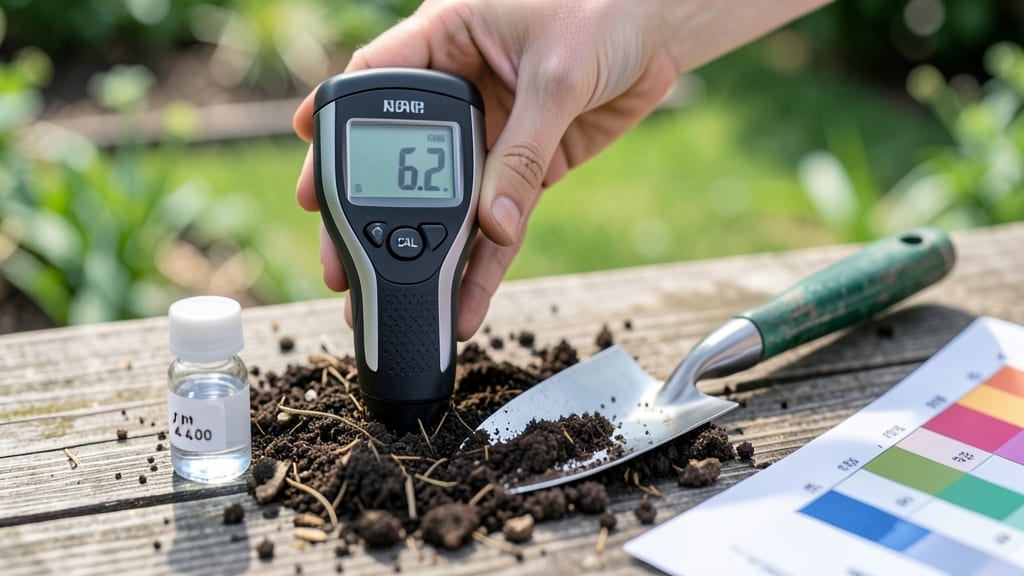
A digital soil pH meter cuts the guesswork out of plant health—no more waiting for lab results or hoping your soil is "good enough." 🌱 I’ve tested hundreds of garden beds with one, and the difference between a thriving tomato patch and a struggling one often comes down to those three little numbers on the screen.
The best part? You get accurate readings in under a minute, right where your plants are growing.
You’ll need just three things: your meter (calibrated and clean), a small trowel, and a spray bottle of water.
The process is simpler than checking your phone battery—just insert the probe, wait 30 seconds, and read the pH. Most meters even store past readings, so you can track how your soil changes over time.
No more digging up plants to test soil or relying on color-changing kits that fade in sunlight.
Once you’ve got your reading, you’ll know exactly what your plants need. A 6.0 pH is perfect for blueberries, while tomatoes thrive at 6.5-6.8. If the meter shows your soil is too acidic (below 6.0), a sprinkle of pelletized lime will raise it over time.
Too alkaline (above 7.5)? Elemental sulfur brings it back down. The meter tells you the truth—no more playing soil roulette.
Here’s the secret I learned the hard way: calibrate your meter every time—even if it worked yesterday. Moisture levels and temperature can throw off readings, so test in damp (not soggy) soil, and avoid testing right after rain.
With a little practice, you’ll spot problems before they show up in your plants—and that’s when your garden starts to feel like a high-stakes win, not a gamble.
📚 In This Guide
- What you need
- Instructions
- Tips and common mistakes
- Wrapping up and next steps
What you need
- ● Digital Soil pH Meter: A calibrated, 5-in-1 model (e.g., Bluelab, Apera, or similar) with automatic temperature compensation.
- ● Soil Samples: 3–5 fresh samples (avoid fertilized or contaminated soil). Collect from 6 inches deep in multiple garden spots.
- ● Distilled Water: 1 cup (240 mL) per sample (tap water can skew results!).
- ● Clean Containers: 3–5 small, sterilized cups or jars (plastic or glass).
- ● Spoon or Trowel: For scooping soil (metal-free if possible).
- ● Calibration Solution: pH 4.0 and 7.0 buffers (included with most meters).
- ● Paper Towels or Kimwipes: For cleaning the meter probe between tests.
- ● Soil pH Test Kit: A backup liquid or strip test for cross-verification.
- ● Notebook: To log pH levels by plant type/location.
- ● Gloves: Nitrile gloves to keep samples sterile.
- ● pH Adjusters: Lime (to raise pH) or sulfur (to lower pH) if you plan to amend soil.
- ● Smartphone Stand: For hands-free meter readings (if your device has a stand mount).
How to use a digital soil pH meter for instant plant health readings
Skip the guesswork and get precise soil data in under a minute—here’s how to use your meter like a pro.
🌱 Step 1: Prepare the Soil Sample for Accurate Testing
Choose a spot where your plants are struggling or where you plan to plant new ones. Dig a small hole about 2-3 inches deep and scoop out a handful of soil—avoid the top layer if it’s dry or recently fertilized. You want a fresh, undisturbed sample that represents the root zone.
Break the soil into small clumps with your fingers (no need to sift). If it’s too dry, add a few drops of distilled water and mix until it feels like damp sand—not wet, just slightly moist. Dry soil gives false readings, while soggy soil can damage the meter’s electrodes. Aim for a texture where it holds together when squeezed but crumbles easily.
💧 Step 2: Calibrate the Meter for Reliable Results
Most digital soil pH meters come with calibration solutions (usually pH 4.0 and 7.0). Start by filling the calibration cup halfway with the pH 7.0 solution, then insert the meter probe until it clicks. Wait 30-60 seconds for the reading to stabilize—you’ll see the display flicker before settling.
If the reading isn’t 7.0 ±0.2, follow the manufacturer’s instructions to recalibrate the meter. Once calibrated, rinse the probe with distilled water and pat it dry with a lint-free cloth. Never use tap water—minerals in it can skew results. Repeat the calibration with the pH 4.0 solution to ensure accuracy across the full range.
☀️ Step 3: Take the Soil Reading in 60 Seconds
Fill the meter’s sample cup with your prepared soil until it reaches the fill line (usually marked on the cup). Insert the probe fully and hold it steady—wiggling can cause inconsistent readings. Wait 60 seconds for the meter to display the pH value. The screen will show fluctuations at first, but it’ll settle on a stable number.
Record the reading in your garden journal along with the plant type and location. For example, blueberries thrive at pH 4.5-5.2, while tomatoes prefer 6.2-6.8. If your reading is off by more than 0.5 points, you’ll need to amend the soil—either with sulfur to lower pH or lime to raise it. Always test multiple spots in your garden, as soil pH can vary by just a few feet.
✂️ Step 4: Clean and Store the Meter for Longevity
After each use, rinse the probe with distilled water to remove soil residue, then wipe it dry with a clean cloth. Store it in a dry place—moisture left on the electrodes can corrupt future readings. Some meters have protective caps; use them to prevent dust buildup. Avoid storing the meter in extreme temperatures (below 32°F or above 100°F), as this can damage the internal sensors.
Check the meter’s calibration every 3-6 months or if readings seem inconsistent. A well-maintained meter lasts for years, giving you instant, no-guesswork insights into your soil’s health. Pro tip: Test your soil at the same time each season—spring and fall are ideal—to track changes over time.
Tips & tricks for perfect digital soil pH meter readings
Mastering your digital soil pH meter takes just a few simple tricks—here’s how to get the most accurate results every time.
Sample Consistency is Key: In Step 1, when preparing your soil sample, focus on breaking it into small clumps rather than grinding it to powder. The meter’s electrodes work best with soil that mimics natural root-zone texture. I’ve found that adding distilled water to dry soil until it holds together when squeezed (but crumbles easily) gives the most reliable readings—this texture mimics how roots actually experience the soil.
Calibration Stability: During Step 2, when calibrating with the pH 7.0 solution, let the meter stabilize for the full 30-60 seconds before checking. I’ve seen readings jump by 0.3 points in the first 10 seconds—patience here prevents false readings. If your meter flickers beyond the 60-second mark, wait another 10 seconds before recording. This extra patience ensures you’re getting the true baseline reading.
Probe Placement Matters: In Step 3, when taking your soil reading, press the probe fully into the sample cup until it clicks. I’ve noticed that even a ¼-inch gap can throw off readings by 0.2 points. Hold the probe steady—wiggling it can create air pockets that disrupt the electrical connection between soil and electrodes. The 60-second wait time is crucial for the meter to account for any minor variations in soil composition.
Seasonal Testing Strategy: For consistent tracking, test your soil at the same time each season—spring and fall work best. I’ve noticed pH fluctuations of up to 0.5 points between seasons due to natural weathering and plant uptake. By testing at the same time annually, you’ll get a clearer picture of long-term trends rather than seasonal variations. This approach helps you make more informed amendments over time.
Pro Tips for Digital Soil Ph Meter
- Mastering your digital soil pH meter takes just a few simple tricks—here’s how to get the most accurate results every time.
- Sample Consistency is Key: In Step 1, when preparing your soil sample, focus on breaking it into small clumps rather than grinding it to powder.
- Calibration Stability: During Step 2, when calibrating with the pH 7.0 solution, let the meter stabilize for the full 30-60 seconds before checking.
Frequently asked questions
Got questions about using a digital soil pH meter? You’re not alone! Here are answers to the most common queries to help you get accurate readings every time.
How often should I check my soil pH?
For most gardeners, testing soil pH once a year is ideal—especially before planting season. If your plants show signs of nutrient deficiencies (like yellowing leaves), test again after adjusting pH or fertilizing. Container plants may need checks every 3–6 months due to faster nutrient depletion.
How long does it take to get a reading?
A digital soil pH meter delivers results in 60 seconds or less! Just insert the probe, wait for the calibration signal (usually 5–10 seconds), then read the digital display. Some advanced models even show trends or suggest amendments instantly.
What if my meter gives inconsistent readings?
Inconsistent readings often mean calibration drift or dirty probes. Start by rinsing the probe with distilled water and recalibrating in a known pH solution (like pH 7.0 buffer). If issues persist, check the battery or replace the probe—some meters have replaceable tips for accuracy.
Are digital pH meters more accurate than test kits?
Yes! Digital meters provide real-time, precise readings (often within ±0.2 pH units), while liquid test kits can be affected by temperature or user error. For critical crops (like blueberries or tomatoes), a digital meter is the gold standard. Budget kits work for casual gardening but may lack consistency.
Can I use a digital pH meter for hydroponics?
Digital meters are perfect for hydroponics because they offer quick, repeatable readings in water-based systems. Just ensure your meter is waterproof and calibrated for liquid solutions. Avoid soil-specific probes—they’re not designed for nutrient solutions.
Why does my meter say "Error" or "Low Battery"?
An "Error" message usually means the probe is damaged, dry, or improperly inserted. For "Low Battery," replace the batteries (alkaline lasts longer than lithium). If the issue persists, check for corrosion on the probe or consult the manual—some meters need a factory reset.
Wrapping up and next steps
Ready to unlock the secret to thriving plants with zero guesswork?
A digital soil pH meter is your instant ticket to healthier gardens—no lab coats or waiting required! 🌱 By mastering this tool, you’ve gained the power to fine-tune your soil’s chemistry in just 60 seconds, ensuring your green friends get the perfect home to flourish.
Your next step? Test that soil today! Grab your meter, pick a plant, and let the data guide your gardening game. Happy growing—your future harvest (or blooms!) will thank you! 🌟